 Talli
For corporate events and internal training
Run the same training at every site, and know who came.
Talli helps corporate event and training teams set up an event once and copy it to each site. Staff check people in at their own door, with or without signal. You watch arrivals live and compare attendance across regions afterward.
Talli runs in the web browser. Door staff can also check people in with Talli for iPhone.
What gets in the way of corporate events and training?
The same problems come up whether you run a sales kickoff, a safety refresher or a compliance course.
The same session runs at many sites
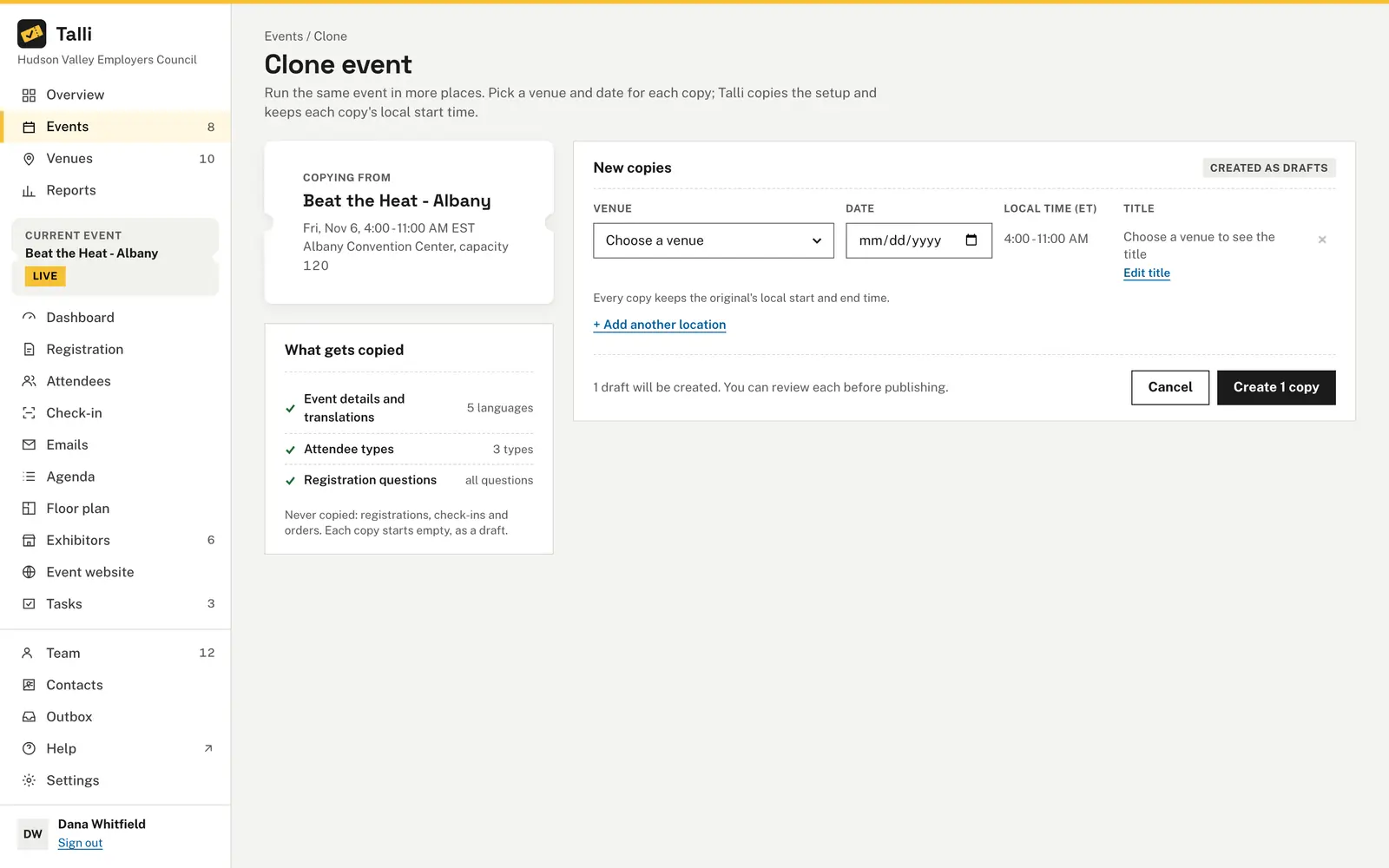
Clone an event to up to 10 venues at once. Each copy is a draft with the original's description, attendee types, questions, agenda, emails, tasks and surveys, so you only pick a venue and a date. How cloning works
Door staff see more than their own door
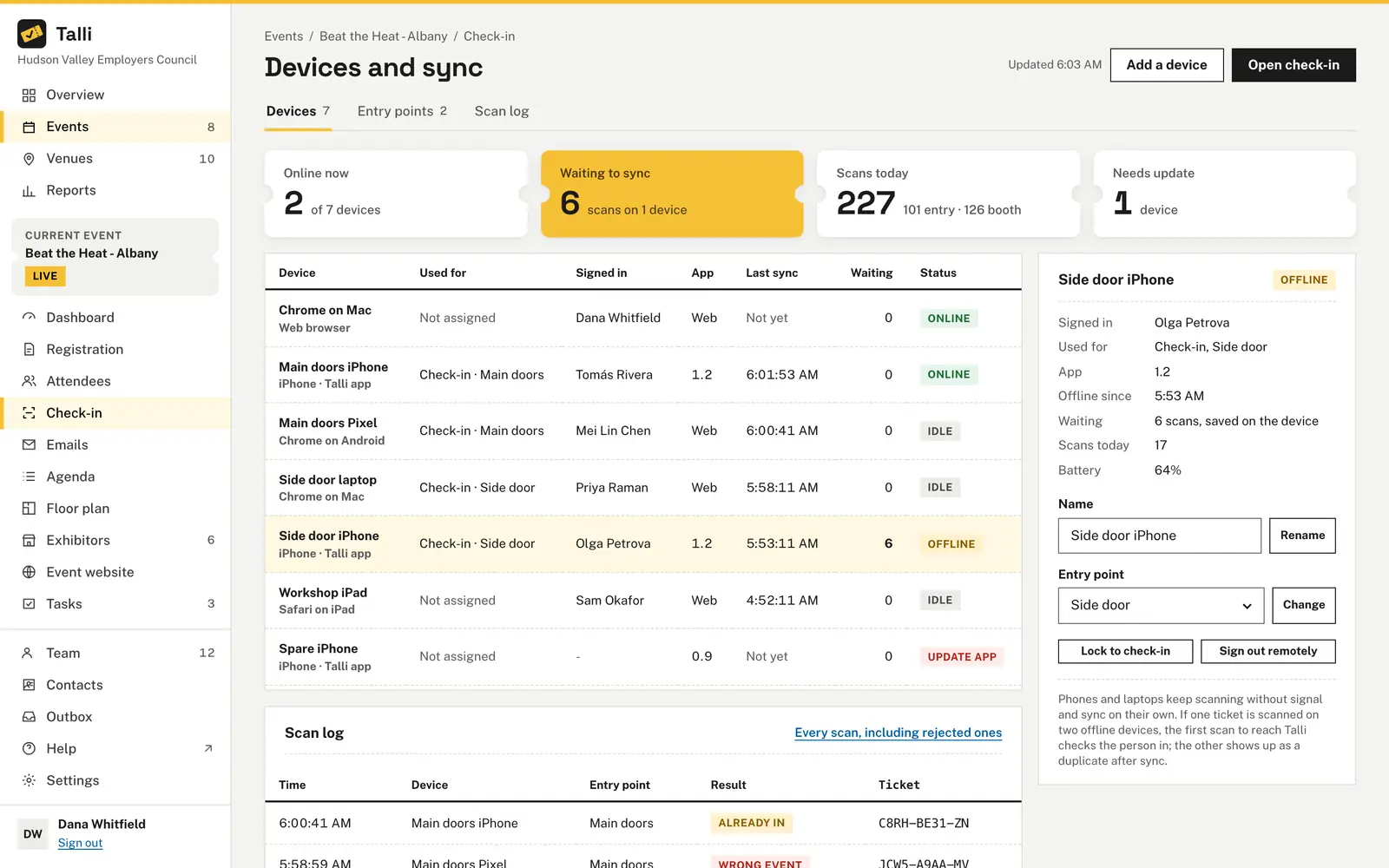
Assign each staff member to the whole event or to one entry point. They then see only the events and doors they are assigned to, in the browser, in the iPhone app and through an assistant. Staff assignments
Training rooms and warehouses have weak signal
Check-in saves the event's list on the device and keeps working without a connection. Waiting scans sync on their own when the connection is back, and each ticket counts once. Offline check-in
Leaders ask who actually attended
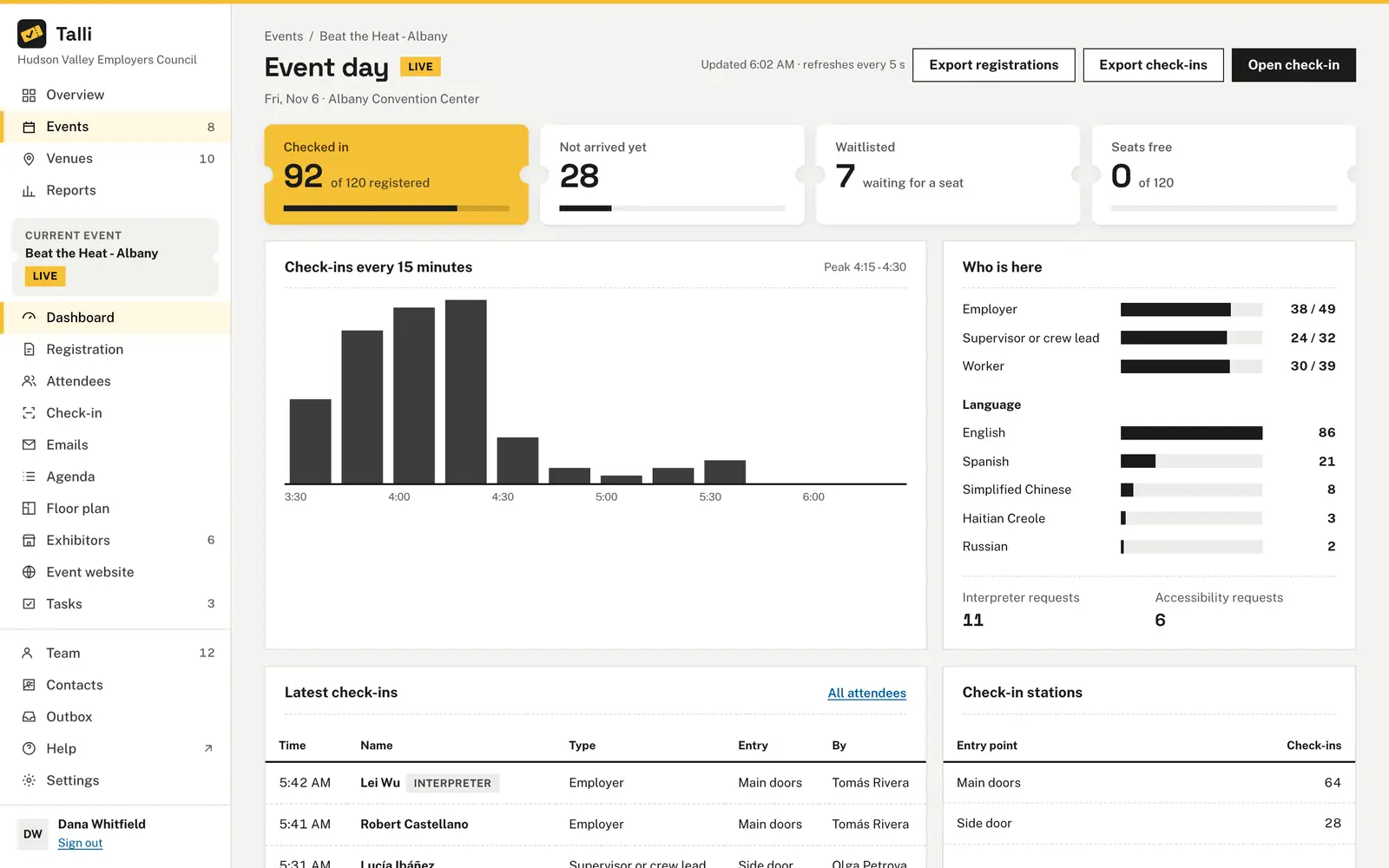
The live dashboard shows who is checked in out of everyone registered. Reports show the show-up rate, repeat attendees and check-ins by region and attendee type for any date range. Dashboard and reports
Your team already works in an AI assistant
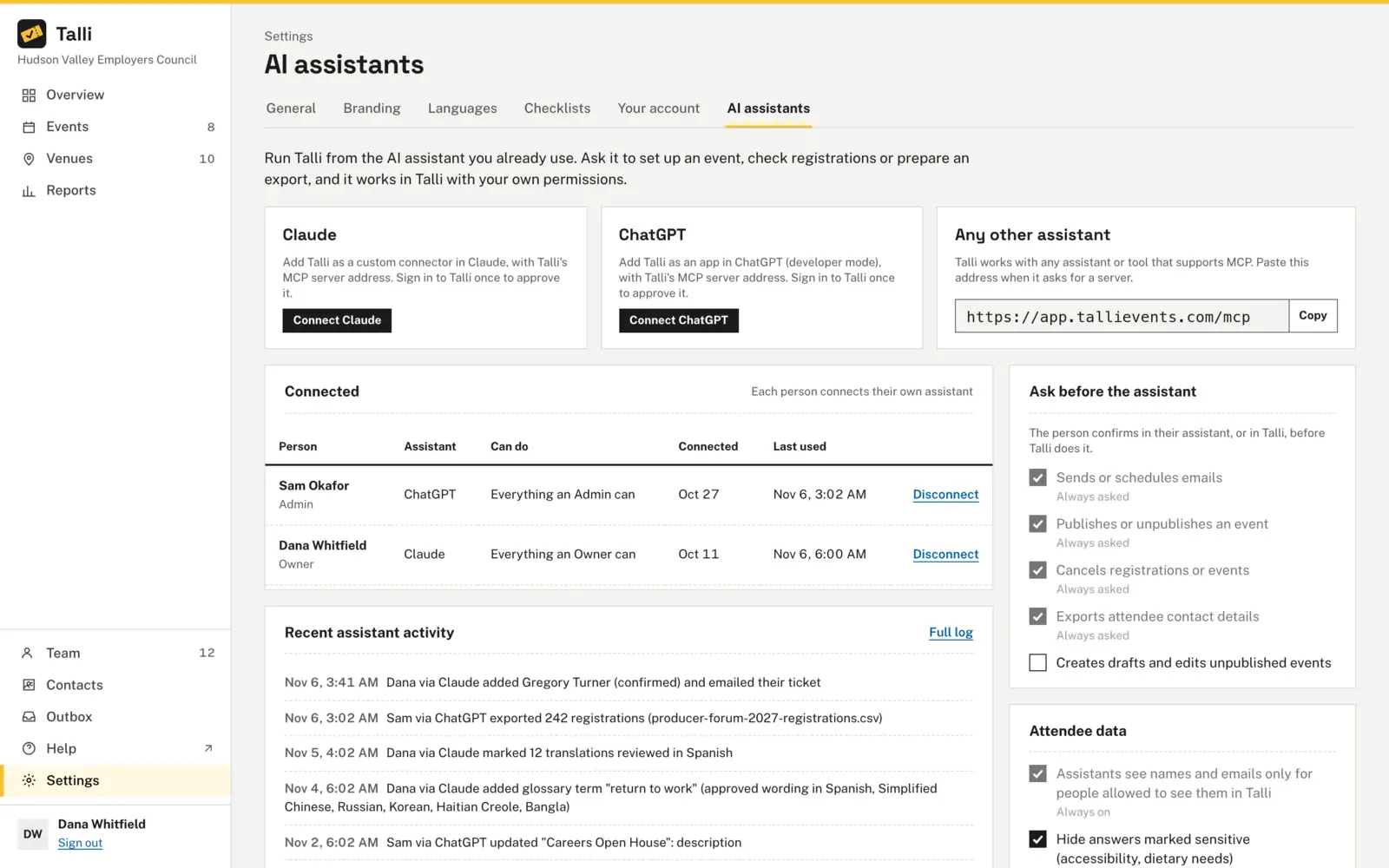
Connect Claude, ChatGPT or another assistant that supports MCP. It works with the person's role, asks for their OK before it publishes, emails or exports, and every change it makes is recorded. AI assistants
How you would plan and run an event with Talli
An example: Harbor Point Logistics runs a half-day Forklift Safety Refresher for employees and contractors at four of its warehouses.
1. Plan
- Add each warehouse on Venues with Add venue, with a region such as East or West.
- Choose + New event at the first warehouse and set its time zone, start, end and capacity. Events
- On Registration, set attendee types such as Employee and Contractor, and add a question shown to one type. Registration form
- Choose Write with AI to draft the description, with the date, venue and seats filled in from the event. Write with AI
2. Open registration
- Choose Clone, then + Add another location for each other warehouse, and create the copies. Cloning
- Review each draft, choose Publish and share the registration link. Registration
- Bring in a list of people from a spreadsheet on the Imports tab of the event's Attendees page. Importing attendees
- Schedule a reminder on the event's Emails timeline, timed from the event date. Emails
3. Before the day
- On Check-in, choose Edit to add entry points such as Main entrance and Dock door. Check-in
- In Devices and sync, on the Entry points tab, assign each staff member to one door under Staff assignments. Devices
- Door staff open Talli for iPhone, tap I'm working the door and choose the event and their door. The home screen says Ready offline. Talli for iPhone
- Track room setup and equipment on the event's Tasks board. Tasks
4. On the day
- Staff scan tickets, type a ticket code or find people by name. Scans made without signal wait on the phone and sync later. Talli for iPhone
- The event's Dashboard shows Event day with a Live badge, check-ins every 15 minutes and Check-in stations. Dashboard
- Devices and sync shows each device, its door and its waiting scans. A lost phone gets Sign out remotely. Devices
5. After
- On Reports, set From, To and Region and compare the warehouses on Attendance. Reports
- Owners and admins choose Export check-ins on the dashboard for a spreadsheet of every arrival. Exports
- Open a survey and read its Results. Surveys
- Ask your connected assistant how each region did. It reads the same reports. AI assistants
What Talli gives corporate event teams
The parts of Talli that matter most when one team runs events across many sites.
Cloning to many venues
Copy an event to up to 10 venues at once, each as a draft on its own date. Times keep their local time of day. Cloning
Entry points and staff assignments
Up to 30 entry points per event. Staff assigned to one door see only that door and its event. Devices and offline
Offline check-in
Scans are saved on the device and synced when the connection is back. Two devices scanning the same ticket still count it once. Devices and offline
Talli for iPhone
The door app scans tickets, types codes and finds people by name, with a banner showing how many check-ins are waiting. Talli for iPhone
Live event dashboard
Checked in, not arrived yet, waitlisted and seats free, refreshed every 5 seconds while the event runs. Dashboard
Reports by date and region
Show-up rate, people reached, repeat attendees and check-ins by region and attendee type, with CSV exports. Reports
AI assistants
Connect an assistant with full or read-only access. Risky actions wait for a person's OK, and its changes are logged. AI assistants
Frequently asked questions
Can staff see only the site or door they work at?
Yes. Owners and admins assign each staff member to the whole event or to one entry point. A staff member with an assignment sees only those events and entry points, in the browser, in the iPhone app and through an assistant.
Does check-in work without Wi-Fi or mobile signal?
Yes. Open check-in while the device still has a connection, and it saves the event's check-in list. Scans made without signal wait on the device and are sent on their own when the connection is back.
Can we set up one training for several sites at once?
Yes. Clone copies an event to up to 10 venues at a time, each as a draft with its own venue, date and title. Registrations, check-ins and orders are not copied, so each copy starts empty.
Can we compare attendance across sites and regions?
Yes. Reports filter by date range and region, and the Attendance tab shows the show-up rate, results by event and check-ins by region and attendee type.
Can an AI assistant change things without asking?
Sending emails, publishing, cancelling and exporting contact details always wait for a person's OK. An owner can also require a confirmation before an assistant creates or edits drafts, or allow staff only read-only assistants.
Plan your next multi-site event in Talli
Ask us for a demo for your team, or sign in to set up your next training.