 Talli
Surveys
Hear from every attendee, in their language.
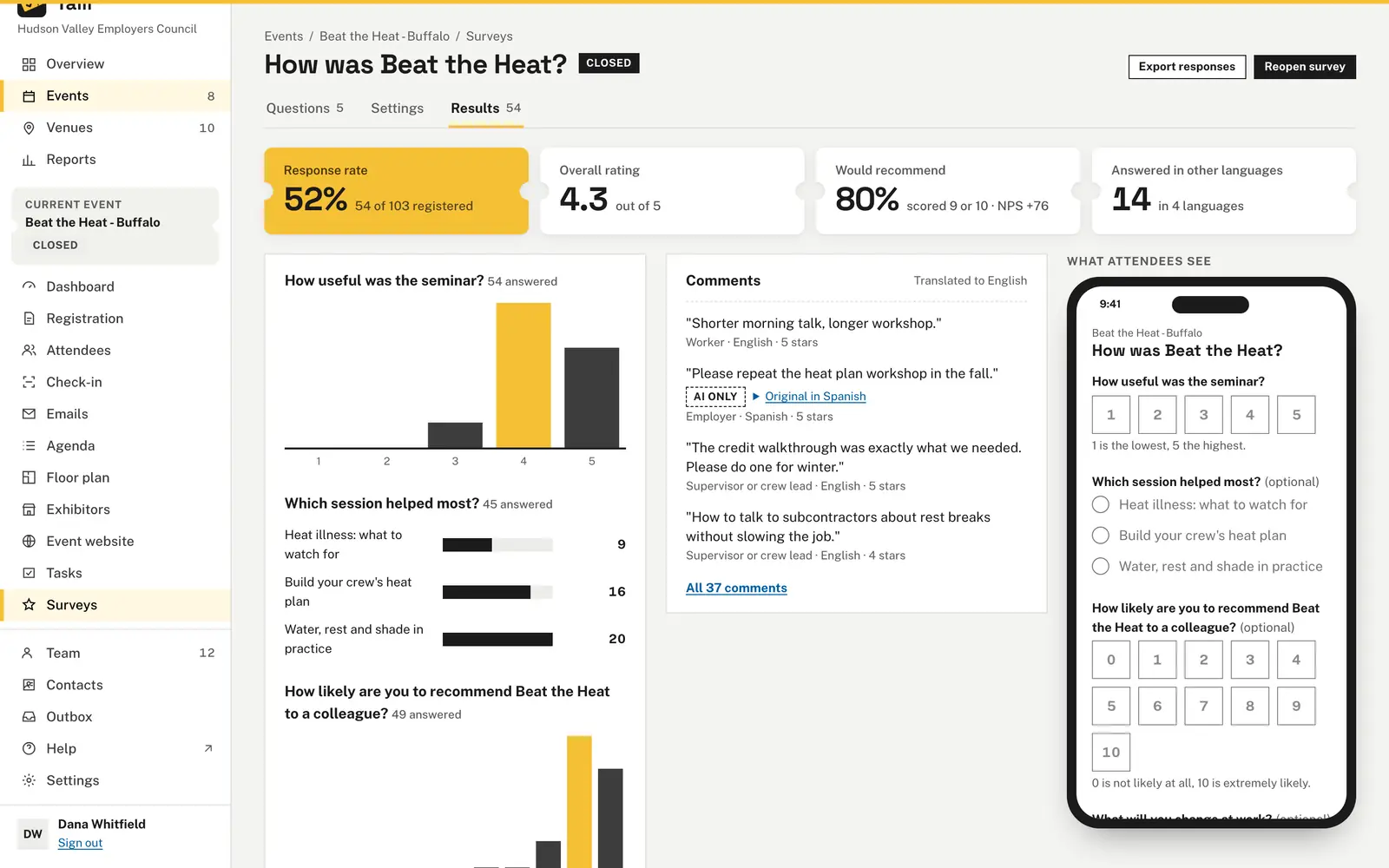
Ask attendees how the event went, on their phone and in their own language. Each attendee answers once from the link in their emails, or you can make a survey anonymous. Results show ratings, a Net Promoter Score and every comment translated for your team.
What makes event feedback hard to collect?
Common problems with post-event surveys, and what Talli does about each one.
Feedback only comes back in one language
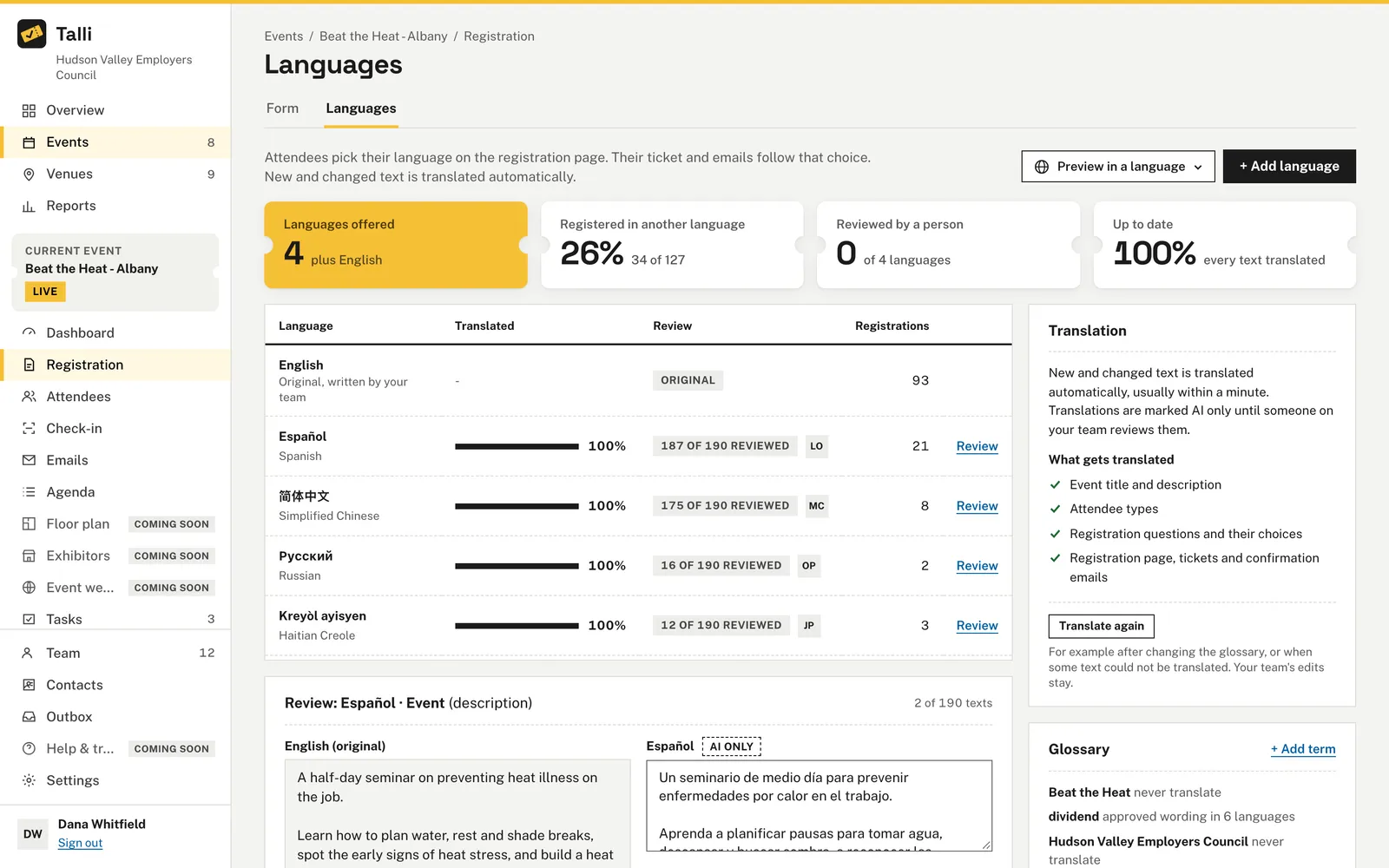
Talli translates the title, questions and choices into each of the event's languages, and you can review them on the Languages tab. The page opens in the language of the attendee's registration. Comments written in another language are shown translated, with the original one click away.
Answers you cannot tie to attendees
On a named survey, each confirmed attendee answers once from their own link and can choose Change my answers while it is open. The response rate shows responses out of confirmed attendees, for example 54 of 103 registered. The export adds each attendee's name, email and attendee type.
People hold back when they can be identified
Turn on Anonymous and nobody's name is kept with their answers. Its links carry no ticket, it keeps only the day each response was sent, and languages with fewer than 5 responses are grouped as Other language. Anyone with the link can answer, up to 10 times an hour from the same connection.
Building a survey takes too long
Add a Rating, 1 to 5, Would recommend, 0 to 10, One choice, Several choices, Comment or Pick a session question, and it starts with sample wording. What attendees see shows the survey on a phone as you build it. Tick Must be answered or Sensitive answers where you need them.
Results are scattered across tools
The Results tab shows the overall rating, the share who would recommend and the Net Promoter Score, with a bar chart for each rating. Comments show the attendee type, language and rating. Export responses downloads a CSV with one row per response.
How it works
From a blank survey to results.
Create the survey
Open an event, choose Surveys, enter a Title, turn on Anonymous if you like and choose Create survey.
Add questions
On the Questions tab, pick a kind under Add a question, change the wording and choose Save questions.
Open it
Choose Open survey and confirm. Talli refuses while the survey has no questions or the event is not published.
Send the link
Choose Send reminder to write a follow-up email with each person's {{surveyLink}}, then schedule or send it.
Read the results
Choose the Results tab to see the numbers, charts and comments, and Close survey when you are done.
Frequently asked questions
Do attendees need an account to answer?
No. Attendees answer from the public page using the link in their email, on a phone or a computer.
Can a survey be anonymous?
Yes. Turn on Anonymous and nobody's name is kept with their answers. Whether a survey is anonymous cannot change once people have answered.
How is the Net Promoter Score calculated?
Would recommend shows the share who scored 9 or 10. The Net Promoter Score is that share minus those who scored 0 to 6.
Can attendees change their answers?
On a named survey, yes. They choose Change my answers while the survey is open, and their one response is updated.
How many questions can a survey have?
Up to 30. A choice question has 2 to 20 choices, and comments are up to 2,000 characters.
Ask your attendees how it went
Ask us for a demo, or sign in to create your first survey.