 Talli
Docs / Events
Cloning events
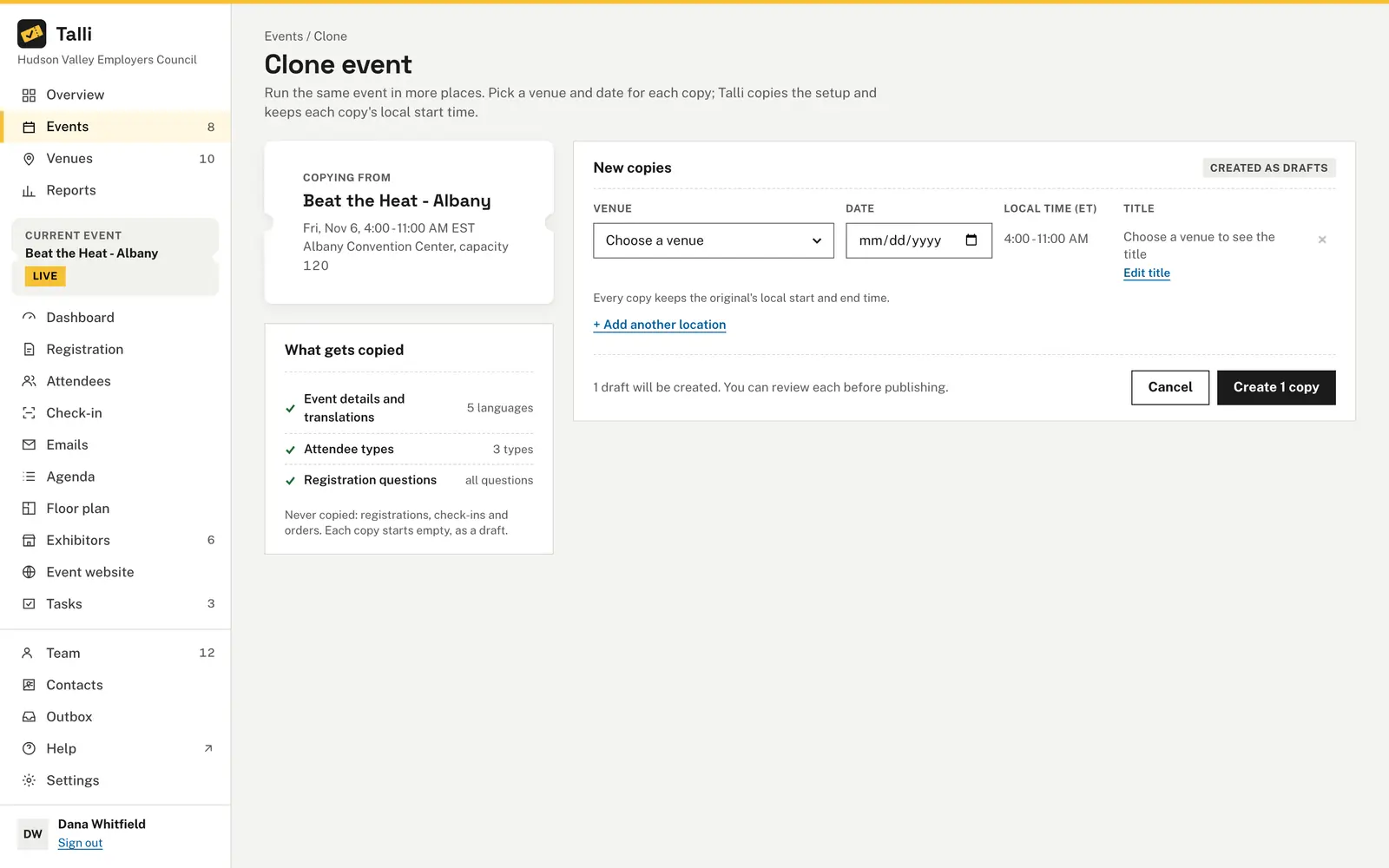
Run the same event in more places by copying it to up to 10 venues at once. Each copy is a new draft with the setup of the original, so you only pick a venue and a date.
Clone an event to one or more venues
Owners and admins:
- Open Events and choose Clone at the end of the event's row, or choose Clone at the top of the event's page.
- In New copies, choose a venue and a date for the first copy.
- Choose + Add another location for each further copy. Each copy has its own venue, date and title. The same venue can appear more than once with different dates.
- Check the titles. Each copy is titled after the original with the new venue's name, for example "Beat the Heat - Buffalo". Type in a title box to use your own wording.
- Choose Create 3 copies (the button shows the number of copies).
Talli opens the Drafts tab of your events list and shows the new drafts. Review each one, then publish it when it is ready. Choose the x at the end of a row to remove that copy before you create them.
Clone the Spring Safety Seminar to our Buffalo and Syracuse venues, one week apart, and show me the plan before creating anything.Select the prompt and copy it into Claude or ChatGPT connected to Talli. Uses find_events, list_venues, clone_event. Connect an assistant
What is copied
- Description, waitlist setting, source language and the languages it is translated into.
- Capacity. If the new venue seats fewer people than the original's capacity, the copy gets the venue's capacity instead, and the page tells you before you create it.
- Attendee types with their seats.
- Registration questions, including which attendee type each one is for, and whether it is required or sensitive.
- Translations of the copied text, with the same status (automatic, reviewed or edited). The copy's title is not translated from the original, because it names the new venue; Talli translates it anew.
- The region comes from the new venue.
- The agenda: every session with its speakers, details and translations. Sessions keep their local time of day on the copy's date, also across a daylight-saving change. Each session is placed in the room of the same name at the new venue; when the new venue has no room by that name, the session keeps the old room's name as its "Where".
- The emails, with their translations. Invitations, reminders, follow-ups and announcements become drafts, so nothing is sent until you schedule them. Emails timed from the event ("7 days before") follow the copy's date; an email on a fixed date moves by as many days as the event did, at the same time of day. Reworded confirmation and waitlist emails keep their words.
- The tasks and checklists. Every task starts again in To do, and its due time keeps its local time of day, moved by as many days as the event did. A task keeps its assignee while that person is still on your team. Checklists are copied with every check unticked.
- The surveys, with their questions and translations. Each copy is a draft, with no responses, and a closing time moves by as many days as the event did.
- The venue layouts the event uses, when the copy is at the same venue. Layouts belong to the venue, so they are shared, not duplicated; a copy at another venue uses none.
- The exhibitors, with their level and notes, as not invited yet. Live booth pages are copied with their translations.
- The event website: its draft sections and theme, unpublished, with the translations of its published text. Speakers sections that picked sessions keep the copies of those sessions. A site name or headline that was the event's title becomes the copy's title.
What is not copied
- Registrations, waitlists, check-ins and orders. Each copy starts empty.
- Who each email was sent to and its results.
- Survey responses.
- Exhibitors' booths and booth visits. Give booths again on the copy's floor plan.
- The web address. Each copy gets its own, made from its title, with a number added if the name is taken.
- The status. Copies are always drafts, even when the original is published.
Dates and times
You choose the date of each copy. The start and end keep the same local time of day in the event's time zone, also when a daylight-saving change falls between the two dates. For example, an event from 9:00 AM to 3:00 PM on March 10 copied to March 18 still runs 9:00 AM to 3:00 PM. An event that runs over several days keeps its length in days. Copies use the original's time zone.
Who can use it
Owners and admins. Staff cannot clone events.
Limits and edge cases
- 1 to 10 copies at a time.
- Every copy needs a venue from your venue library and a real date. Talli shows a message next to each row that needs fixing and creates nothing until all rows are valid.
- Titles are up to 200 characters.
- Each copy is created completely or not at all, and each one is recorded in the activity log. If something goes wrong part way through, Talli shows an error and the copies made before the problem are kept, so check your events list before trying again.
- Cloning a copy works the same way, and the copies stay linked as one series.
- Adding and removing rows needs scripts to be running in the browser. A single copy can be created without them.
Coming soon
- Choosing which parts to copy.
From an AI assistant
Use clone_event with { eventId, targets }. targets is a list of 1 to 10 items, each { venueId, date, title? }:
venueId: a venue id fromlist_venues.date:YYYY-MM-DDin the event's time zone.title: optional, defaults to the original title with the venue name.
Find eventId with find_events. The result lists the new event ids, which you can open with get_event. The call writes new drafts and is recorded in the activity log, for example "Dana via Claude cloned Beat the Heat - Albany to Rochester, Jul 20". If an owner asked for confirmation before draft changes, the person confirms first; see AI assistants.